
How to Auto-Import Runes in League of Legends (2026)
Picking two rune paths, six runes and three shards every champion select is time you could spend on the draft. League has a built-in recommender, and seven popular apps do it in one click or none. Here is how each one works, and how to avoid the full-rune-page problem.
Disclosure: we build Hexgate, one of the apps below.
Short Answer
The League client can suggest rune pages on its own (the Rune Recommender), and seven popular apps can set the highest win rate runes for you in one click or automatically. The built-in option is fine for a quick default. An app is better when you want runes for your exact role and matchup, summoner spells set at the same time, and no hunting through recommended pages.
- You only want a sensible default and no installsRune RecommenderBuilt into the League clientYou pick one of up to 3 pages
- Our pickYou want runes and spells in one click, then items that respond to the game you are inHexgateFree for 3 games a day, no adsOne click, then counters and in-game items
- You want an automatic import and nothing elseU.GGFreeAutomatic, by elo, role and matchup
- You already use OP.GG, Blitz or Mobalytics for other thingsTheir importerFree with adsKeep it to one app
Eleven Picks, One Click
A rune page is eleven separate choices: two paths, a keystone, five runes and three shards. Every importer below makes all eleven for you. Here is what that looks like, next to how each app does it.
 Hexgate: Master Yi
 Jungle
 Domination

 Hail of Blades

 Sudden Impact

 Sixth Sense

 Treasure Hunter
 Precision

 Skipped row

 Legend: Alacrity

 Coup de Grace
-


 Attack Speed
 Adaptive Force
 Health Scaling
How each one fills the page
The client hands you pages to choose from. The apps write the page for you.
- League clientRune Recommender: you pick one of up to 3 recommended pages
- Hexgate Our pickOne click in its champion select window, summoner spells optional; Import to slot in Swiftplay lobbies
- U.GGAutomatic, tailored by elo, role and matchup
- OP.GG DesktopAutomatic configuration
- BlitzAutomatic
- MobalyticsImport button or automatic
- PorofessorImport from its champion select view
- iTeroOne click
AutomaticYou click importYou pick a page
Hexgate does it in one click, summoner spells included if you want, in D/F order of your choice. Then it stays with you: items in game and, with Pro+, scouting before and a breakdown after.
See the real windowOption 1: The League Client's Rune Recommender
Since patch 12.23, champion select has a built-in Rune Recommender. It offers up to three rune pages for your champion and role, refreshed every patch. To use it, open the rune editor in champion select and pick one of the recommended pages.
Good
- Free, nothing to install, always available.
Limits
- It knows your champion and role, not your lane opponent.
- It does not set summoner spells.
- It does not tell you which of its pages is winning more right now.
Option 2: Apps That Import Runes for You
How each app imports is in the list above. Here is what else it sets, where it runs and what the free version costs you.
| App | Also sets | Platform | Free tier |
|---|---|---|---|
| Hexgate | Summoner spells (optional, with D/F flip) | Native Windows, no Overwolf | 3 games/day, no ads |
| U.GG | Items | Desktop app | Free |
| OP.GG Desktop | Items | Electron | Free with ads |
| Blitz | Items, summoner spells (off by default) | Electron | Free with ads |
| Mobalytics | Items, summoner spells | Overwolf | Free with ads |
| Porofessor | No | Standalone or Overwolf | Free with ads |
| iTero | Items | Overwolf or standalone | Free with ads |
Every one of these uses the League client's own interface to create a rune page, exactly what you would do by hand, which is why rune import is one of the oldest and least controversial features in companion apps. If you want the rules spelled out, see can you get banned for LoL apps.
How to Import Runes With Hexgate
Install and sign in
Download Hexgate for Windows, sign in with a free account and start League as usual.
Lock in your champion
Hexgate's champion select window shows the highest win rate runes for your champion and role, with summoner spells beside them, plus counters and ban targets.
Choose spells and order
Tick Spells to import summoner spells too, and Flip to swap them between D and F. Hexgate remembers both settings for next time.
Click Import Runes
Hexgate creates a page named after your champion (for example "Hexgate: Ahri") and selects it in the client.
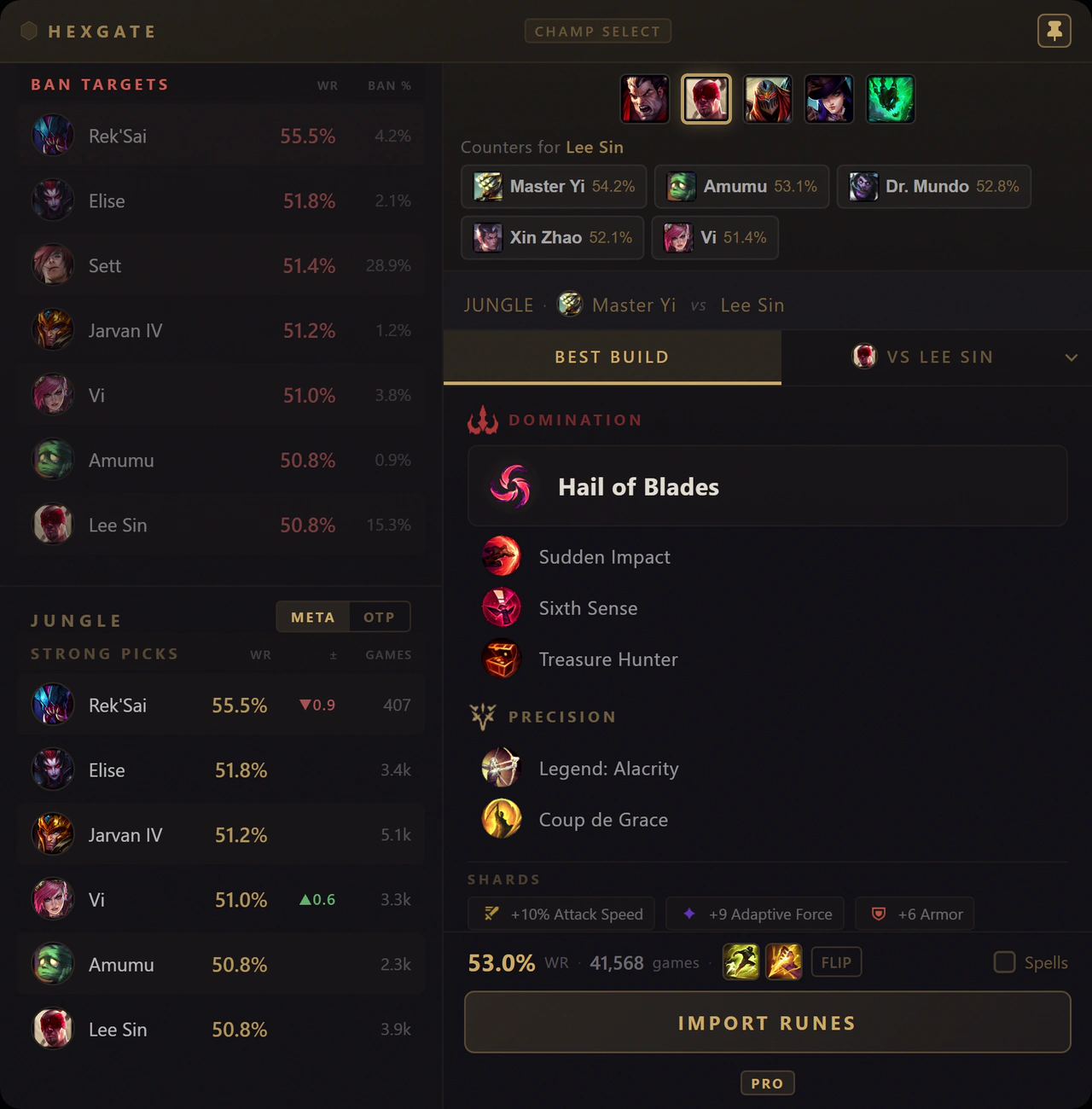
Champion select: ban targets and strong picks on the left, counters for the enemy pick at the top, then the runes, the spells with Flip and Spells, and one Import Runes button. The VS Lee Sin tab is the Pro matchup page.
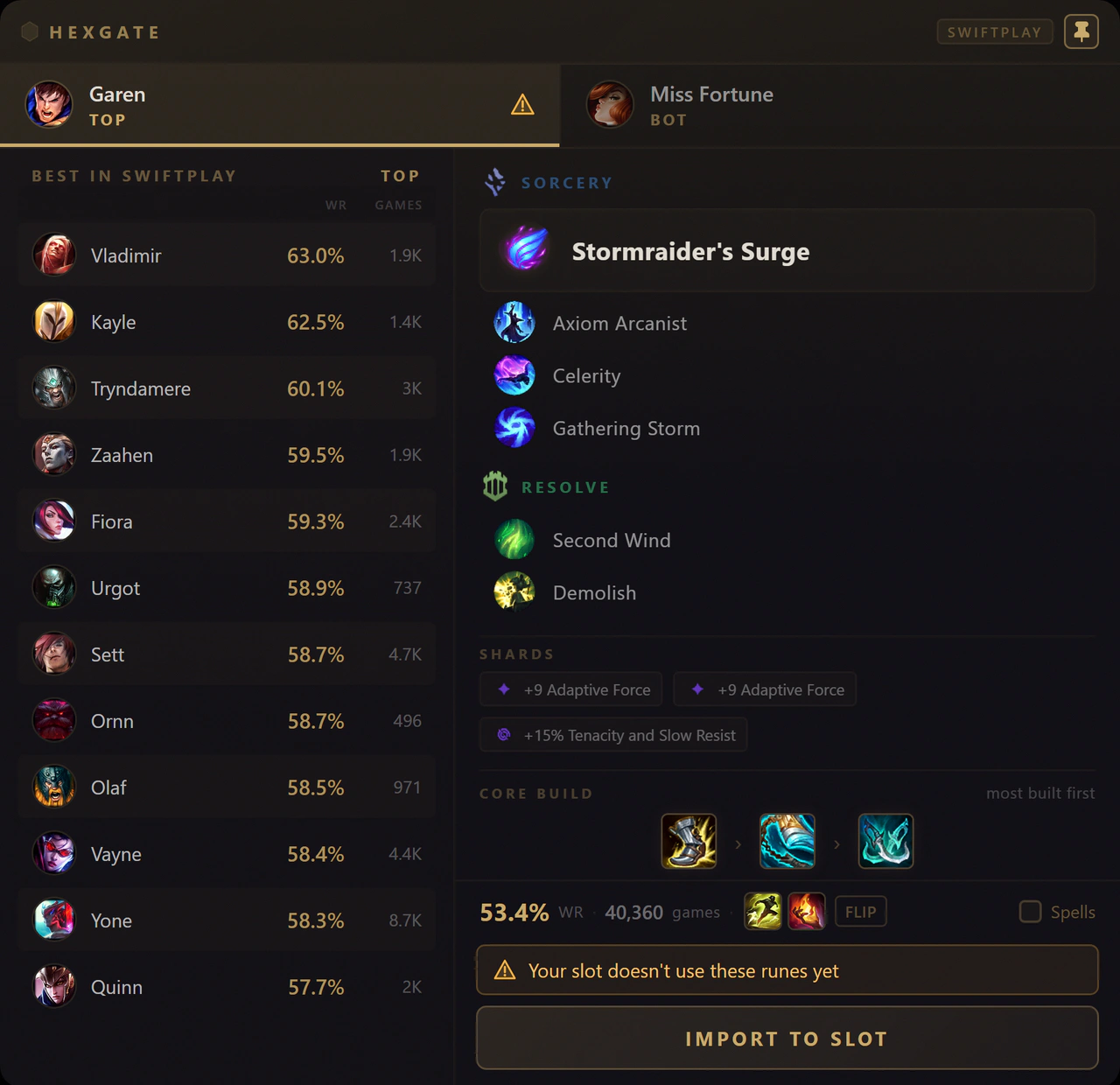
Swiftplay lobby: one tab per pick slot. The warning shows when a slot's runes differ from the recommendation, and Import to Slot writes the runes and spells straight into that slot.
After the import, the same app covers the whole game
Runes are where Hexgate starts, not where it stops.
- Champion selectCounters and ban targets for your role, next to the runes.FREE
- Champion selectVS imports runes for your lane matchup and names the page after the opponent ("Hexgate: vs Zed").PRO
- Champion selectOTP imports what one-trick players of your champion run.PRO
- Swiftplay lobbyThe best picks for each pick slot, with runes, core build and spells imported straight into the slot.FREE
- Loading screenLane Scouting in ranked: your lane opponent's and the enemy jungler's habits from their own recent ranked games.PRO+
- In gameYour items re-ranked against the five enemies you face, with the reason on every move. This is the part no rune importer covers; more in best LoL build apps.FREE
- In gameHold Tab and each lane's item gold difference appears on League's own scoreboard, with both team totals above it.FREE
- After the gameA Match Breakdown of every ranked, Draft and Swiftplay game: why you won or lost, and one tip for the next game.PRO+
- After the gameClips of every death, kill and assist, recorded on your PC to rewatch.PRO+
Lock in, check the page, click once
Spells come along if you ticked them, in the D/F order you set, and the next import replaces Hexgate's last page instead of adding another.
The Full Rune Page Problem (and the Fix)
An app can only import into a page it is allowed to create or replace, and you can hold up to 25 custom pages. Two habits avoid every problem:
Leave one page for the app
Hexgate keeps a single page for itself: each import replaces its previous "Hexgate:" page rather than adding a new one. On the very first import it takes over one of your editable pages, so if you keep pages you care about, leave a spare one.
Let only one app import runes
If you run two apps that both auto-import, they overwrite each other in the same champion select. Keep import on in one and turn it off in the others.
Which Modes Have Runes?
- Summoner's RiftRanked, normals and Swiftplay use runes, so importers work there.
- Regular ARAMUses runes, so importers work there too.
- ARAM MayhemRunes are disabled: augments take their place. Hexgate puts an S to D tier under every augment card.
In ARAM Mayhem the useful tool is an augment overlay that rates the cards for your champion. We compared those in ARAM Mayhem overlays.
Frequently Asked Questions
How do I auto import runes in League of Legends?
Either use the League client's built-in Rune Recommender, which offers up to three rune pages for your champion and role, or a companion app such as Hexgate, U.GG, OP.GG, Blitz, Mobalytics, Porofessor or iTero, which imports the runes for you in champion select in one click or automatically.
Is importing runes with an app allowed?
Yes. Rune import uses the League client's own interface to create a rune page, the same way you would by hand. It is one of the oldest and most common features of companion apps.
What happens if all my rune pages are full?
An app needs a page it is allowed to replace. Hexgate keeps one page for itself: each import replaces its previous page, and on the very first import it takes over one of your editable pages. If you keep pages you care about, leave one spare page for the app. You can hold up to 25 custom pages in total.
Does the League client have its own rune recommendations?
Yes. The Rune Recommender, added in patch 12.23, shows up to three recommended rune pages for your champion and role in champion select and is updated every patch. It does not use your matchup or the enemy team.
Do rune importers work in ARAM Mayhem?
Runes are disabled in ARAM Mayhem, so there is nothing to import. Augments take their place, and an augment overlay such as Hexgate's rates them on screen instead.