ComparisonUpdated for Patch 26.20Updated October 10, 2026 · 9 min read
U.GG vs Mobalytics: Which One Fits How You Play?
U.GG is a build and stats site first, Mobalytics is an improvement coach first. Here is the side-by-side with October 2026 prices, what each install costs your PC, and who should pick which.
One disclosure before going further: we build Hexgate, an in-game build overlay for League of Legends. It shows up below as a third option: it adapts your items to the enemy team during the game, which neither app you searched for is built around, and Pro+ adds lane scouting and a breakdown of every game. Everything else is a straight comparison, with prices taken from each company's own pricing page.
Short Answer: Pick by the Question You Are Asking
Pick U.GG if you want the right build, runes and counters fast, filtered by rank, role and lane matchup, from a light standalone app or straight from the website. Pick Mobalytics if you want to know why you lose: its GPI score, matchup advice and post-game review are built to change how you play over months. U.GG is also the cheaper way to go ad-free, at $2.49 per month billed yearly against $5.83 for Mobalytics Plus.
Every question a player asks, from champ select to a season of games, tagged with the app built to answer it. Pick yours.
Before the game
During the game
After the game
Across many games
"What should I pick and build this patch?"
U.GG
Its champion pages give the highest win rate build, runes, skill order and counters, and you can filter them by rank, role and the champion you are laning against. The website covers all of that without installing anything.
Website or standalone app, no Overwolf
Free with ads / Plus $3.99 a month
"Which runes for this lane matchup?"
U.GG
The desktop app brings the data into champ select: auto-imported loadouts tailored by rank, role and matchup, plus champion select scouting.
Standalone Windows app (no Overwolf)
Free with ads / Plus $3.99 a month
"How do I play this lane?"
Mobalytics
The Live Companion prepares you for the next game with information on every player, matchup advice and build recommendations. Plus adds matchup-specific advice and champion combos, so you learn how to play a lane, not just what to buy.
Mobalytics Desktop on Overwolf, or the website
Free with ads / Plus $9.99 a month
"How does my lane opponent play, and which lane does their jungler gank?"
Hexgate Pro+
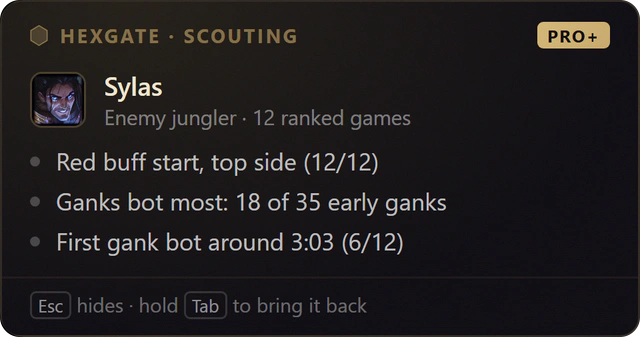
Lane Scouting reads your lane opponent's and the enemy jungler's own recent ranked or Swiftplay games and shows their habits on the loading screen, before minions spawn: where the jungler starts, which lane he ganks first and how your opponent plays the early lane.
Real card: the enemy jungler's start and first gank, from his own games.
"Am I keeping up with my rank right now?"
U.GG
The desktop app's live stat tracker benchmarks you by rank, champion and role while you play, next to in-game builds, a skill leveling order and a team gold difference overlay.
Standalone Windows app (no Overwolf)
Free with ads / Plus $3.99 a month
"What do I buy against these five enemies?"
Hexgate Our pick
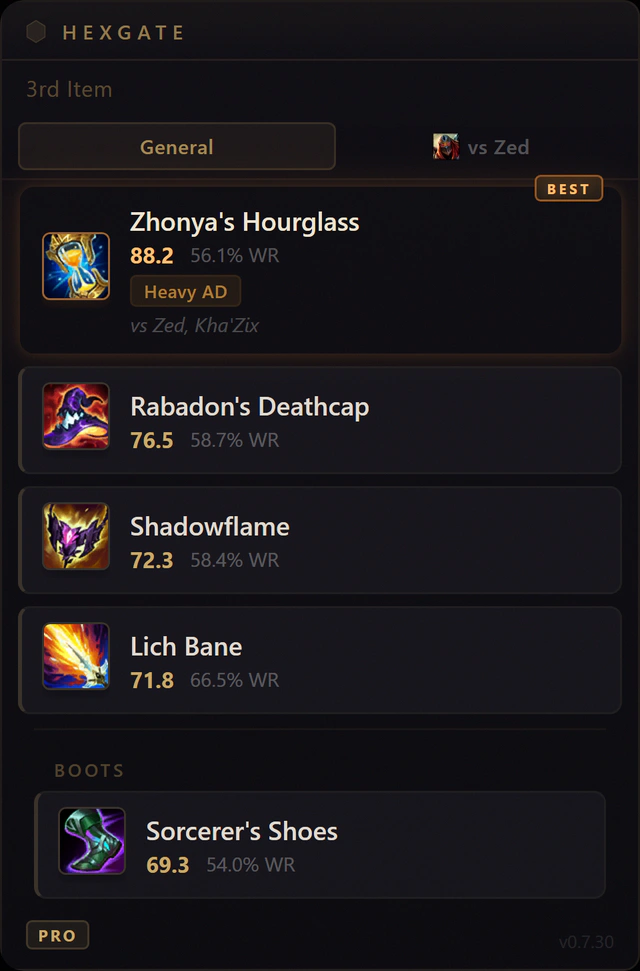
Neither app is built around this one: both hand you the build that won most often across thousands of games, decided before you see the enemy team. Hexgate reads the enemy team from Riot's Live Client Data API and reorders the situational item slots against their damage split, crowd control, healing, shields, tankiness and who is fed. Every move shows its reason in the overlay.
Real overlay, in game: Zed and Kha'Zix push Zhonya's Hourglass to first.
"How much LP did that game cost me?"
U.GG
Profiles show LP gained or lost on every ranked game, which most stats sites still do not show. The post-game screen adds a Carry Score and timeline data.
Website or standalone app
Free with ads / Plus $3.99 a month
"What were my best plays?"
Mobalytics
Smart Highlights, part of Plus, pick out your top plays after a game.
Plus $9.99 a month, 7-day free trial
"Why did I win or lose that game, and what do I fix next?"
Hexgate Pro+
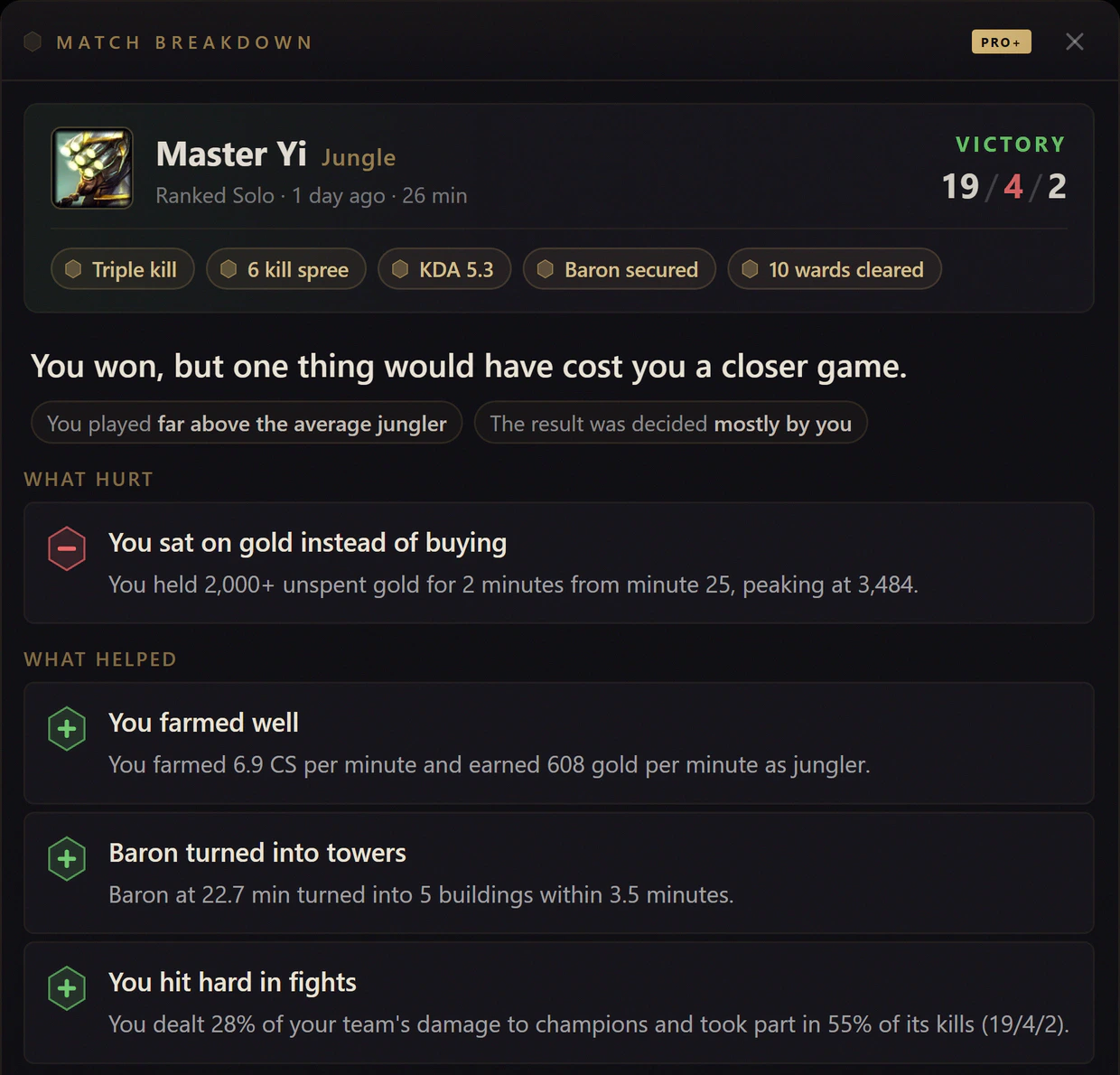
The Match Breakdown reads the game's own timeline after every ranked, Normal Draft and Swiftplay game: a one-line verdict, what hurt and what helped, each with the evidence from your game, and one tip for your next game.
Real breakdown: one leak, three reasons it did not matter.
"How exactly did I die?"
Hexgate Pro+
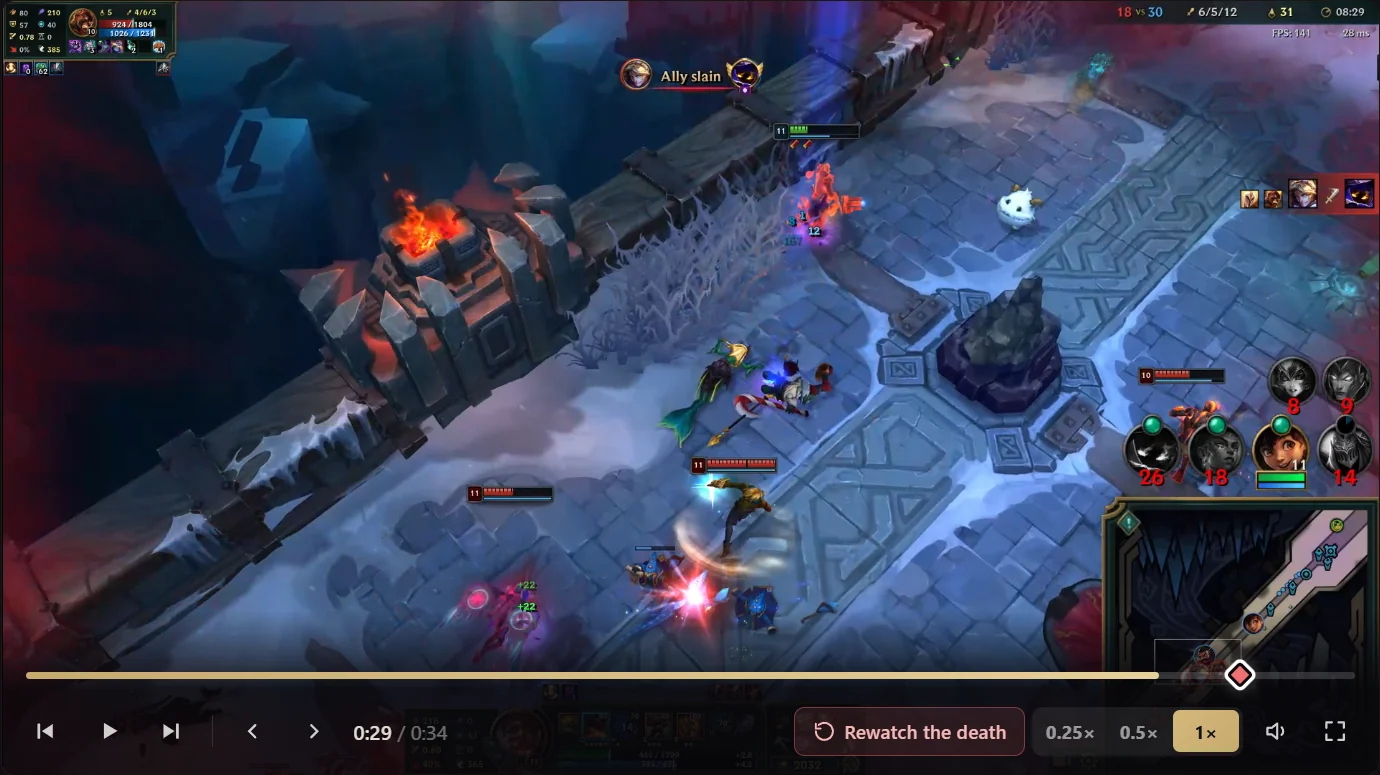
Clips records your games while you play and keeps every death, kill and assist as a clip on your PC, ready to rewatch in slow motion when the game ends. Nothing is uploaded.
Its signature Gamer Performance Index (GPI) scores your play across skills like farming, fighting, vision and survivability and tracks how they move over time. It gives you a per-skill picture you cannot get from a win-loss column, and Plus adds GPI progress tracking.
Website or Mobalytics Desktop on Overwolf
Free with ads / Plus $9.99 a month
"Which mistakes do I keep repeating?"
Hexgate Pro+
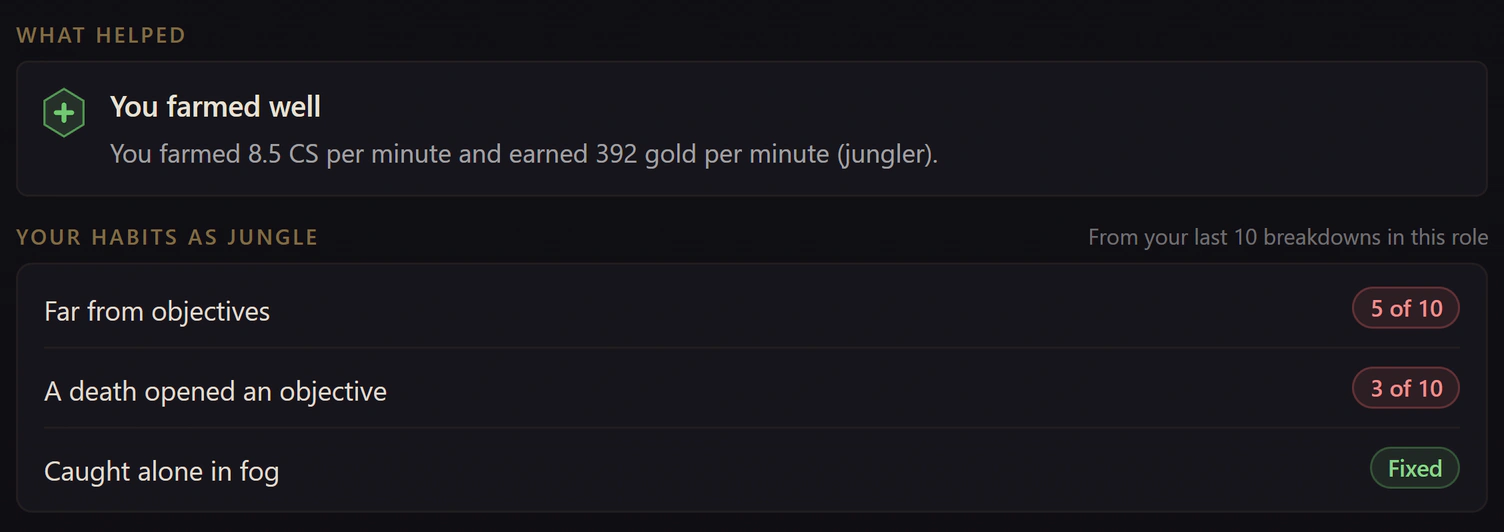
Across your breakdowns, Hexgate lists the habits that keep coming back for your role, such as dying far from objectives, counted over your last 10 games, and marks one as fixed once it stops showing up.
Real habits list: two that repeat, one marked fixed.
Count the tags: U.GG answers the questions about this game, Mobalytics the ones about you as a player. They overlap less than the "vs" suggests. The question in the middle of the game, what to buy against the enemy team in front of you, is the one neither is built around. That is where Hexgate fits, and with Pro+ it also scouts your lane before the game, breaks down every game after it and tracks the habits you repeat.
U.GG vs Mobalytics vs Hexgate, Side by Side
Hexgate is the third column because it is the tool we would add next to either app, not a replacement for them. It answers the in-game item question for free, and Pro+ adds coaching before and after the game.
Feature
U.GG
Mobalytics
Third optionHexgate
Built to answer
What to pick and build this game
Why you lose, across many games
What to buy against this enemy team, in game; with Pro+, why you won or lost
Builds
Highest win rate build, runes, skill order and counters
Recommended builds plus matchup advice
Situational items re-ranked against the five enemies
Lane matchup
Filter builds by lane opponent
Matchup-specific advice (Plus)
Lane matchup scoring Pro; each lane's gold difference on League's scoreboard Free
Scouting before the game
Champion select scouting
Live Companion with information on every player
Lane opponent and enemy jungler habits on the loading screen Pro+
Progress over many games
No
GPI, with progress tracking in Plus
Habits you repeat, marked fixed when they stop Pro+
After the game
Carry Score, timeline data, LP per ranked game
Smart Highlights (Plus)
Match Breakdown and Clips of every death Pro+
Install
Standalone Windows app, or the website
Mobalytics Desktop on Overwolf, or the website
Native Tauri/Rust app, typically under 100 MB
Needs Overwolf
No
Yes, for the desktop app
No
Ads on free
Yes
Yes
No
Paid plan
Plus: $3.99/mo or $29.88/yr
Plus: $9.99/mo, $24.99 per 3 months or $69.99/yr
Pro €9.99/mo (€7.49/mo yearly); Pro+ €14.99/mo (€11.24/mo yearly)
Games
League, Valorant, Deadlock, World of Warcraft
League, TFT, Valorant and others
League of Legends
The Core Difference: Build Lookup vs Improvement Coach
U.GG answers "what should I do this game?" Its champion pages give the highest win rate build, runes, skill order and counters, and you can filter them by rank, role and the champion you are laning against. The website covers all of that without installing anything. The desktop app adds the same data in champ select and in game: auto-imported loadouts tailored by rank, role and matchup, champion select scouting, in-game builds, a skill leveling order, a team gold difference overlay and a live stat tracker with benchmarks by rank, champion and role.
Mobalytics answers "why do I keep losing?" Its signature feature is the Gamer Performance Index (GPI), which scores your play across skills like farming, fighting, vision and survivability and tracks how they move over time. The Live Companion prepares you for the next game with information on every player, matchup advice and build recommendations, and Plus adds champion combos, challenges and Smart Highlights that pick out your top plays after a game.
So the honest framing is: U.GG makes each individual game easier to prepare. Mobalytics tries to make you a better player across dozens of games. Many players want both, and they overlap less than the "vs" suggests.
U.GG The build lookup
Free (ads) / Plus $3.99 a monthStandalone app or the website, no OverwolfLeague, Valorant, Deadlock, WoW from one install
What U.GG does well
Speed and precision. U.GG's build pages are clean, load fast and let you narrow the data to your rank and lane matchup, which matters because the best Emerald+ build and the best Iron build are often not the same. Profiles track LP on every ranked game, which most stats sites still do not show. The post-game screen gives a Carry Score and timeline data, and the app covers League, Valorant, Deadlock and World of Warcraft from one install.
Where U.GG falls short
The free tier shows ads on the site and in the app.
U.GG tells you what wins, not why you lost: there is no skill score or coaching layer like Mobalytics' GPI, so it will not point at your recurring mistakes.
Its builds, like every stats site's, come from what won most often for your champion, filtered by rank and matchup, rather than from the five enemies you are facing right now.
Free (ads) / Plus $9.99 a monthDesktop app on Overwolf or the websiteLeague, TFT, Valorant and others, one Plus price
What Mobalytics does well
Feedback over time. If your problem is "I play a lot and do not improve," the GPI gives you a per-skill picture you cannot get from a win-loss column, and the matchup advice explains how to play a lane, not just what to buy. Mobalytics also covers more games than most rivals (League, TFT, Valorant and others), and Plus works across all of them for one price.
Where Mobalytics falls short
Mobalytics Desktop runs on Overwolf, so you run the Overwolf platform plus the app on top of League. On a 16 GB machine with Discord and a browser open, that is a noticeable extra load.
The free tier carries ads, and the best coaching features sit behind Plus, the pricier of the two subscriptions at $9.99 per month.
Its build recommendations are aggregate builds too, decided before the game starts.
Both apps are free to use with ads. Both sell one subscription that removes the ads and unlocks extra features, and both offer a 7-day free trial.
Plan
U.GG Plus
Mobalytics Plus
Monthly
$3.99 per month
$9.99 per month
Longer plans
$29.88 per year ($2.49 per month)
$24.99 per 3 months, $69.99 per year ($5.83 per month)
Free trial
7 days
7 days
What paying adds
No ads on the site and app, personal counters and stats, a personal tier list, profile customization, priority support
No ads in every game and on the blog, matchup-specific advice, champion combos, GPI progress tracking, challenges, Smart Highlights, early access
One year, month to month
$47.88
$119.88
Paid yearly, Mobalytics costs $40.11 more than U.GG. That gap is the price of coaching features U.GG does not try to offer, so it is only worth it if you will actually use them. If all you want is no ads on a build site, U.GG Plus is the better deal.
Install Weight and Overwolf
This is the clearest practical difference. U.GG's desktop app installs as its own Windows program and does not ask you to install the Overwolf client, and U.GG is no longer listed in the Overwolf app store. Mobalytics Desktop is distributed through Overwolf, which means two layers: the Overwolf host and the Mobalytics app inside it. If your PC struggles to hold steady FPS in team fights, the lighter install is a real reason to prefer U.GG; with 32 GB of RAM it will not decide anything.
Rule of thumb: on a weaker PC, use U.GG's website or app for builds and open Mobalytics on the web for your GPI review after a session. You get both tools without running Overwolf during games.
Riot Safety
Riot's official data
No game file changes
No automated input
Both are long-running, mainstream League apps that work from Riot's official data and stay within Riot's third-party rules (U.GG labels its app "Riot Games Compliant"). Neither modifies game files or automates input. Using either one will not get your account banned; for the full picture of what Riot allows, see can you get banned for LoL apps.
The Gap Both Apps Share: Your Actual Enemy Team
Look at where each app's build comes from. U.GG gives you the build that won most often for your champion, filtered by rank, role and lane opponent. Mobalytics gives you its recommended build plus advice for the matchup. Both are decided by data across thousands of games, before you know whether the enemy team is four AD champions and a Malphite or five mages.
Hexgate starts from the same kind of win rate data and then does the part neither app is built around: during the game it reads the enemy team from Riot's Live Client Data API and reorders the situational item slots against their damage split, crowd control, healing, shields, tankiness and who is fed. The first core items stay data-driven, because they rarely change; the later slots move, and every move shows its reason in the overlay ("armor up: 3 AD threats").
What Hexgate adds
Situational items re-ranked against the five enemies in your game, with the reason for every move. Free, 3 games a day.
In champ select: the highest win rate runes with one-click import, plus counters and ban targets. Free.
Hold Tab in game and every lane's item gold difference appears on League's own scoreboard, with both team totals: gold difference in LoL without leaving the game. Free.
An S to D tier under every ARAM Mayhem augment card, and a Swiftplay lobby window with picks, runes and the core build for each slot. Free.
Unlimited games in every mode, lane matchup scoring and one-trick builds Pro for €9.99 per month (€7.49 per month billed annually).
Lane Scouting of your lane opponent and the enemy jungler on the loading screen, a Match Breakdown of every ranked, Draft and Swiftplay game, the habits you keep repeating across your last 10 games of a role, and Clips of every death, kill and assist Pro+ for €14.99 per month (€11.24 per month billed annually).
A native Tauri/Rust app for Windows: no Overwolf, no Electron, typically under 100 MB of memory, and no ads, including on the free tier.
What it does not replace
Tier lists, LP tracking and a GPI-style skill score: keep U.GG or Mobalytics for those.
Timers: Hexgate has none.
Other games and other systems: Hexgate is League of Legends only, on Windows.
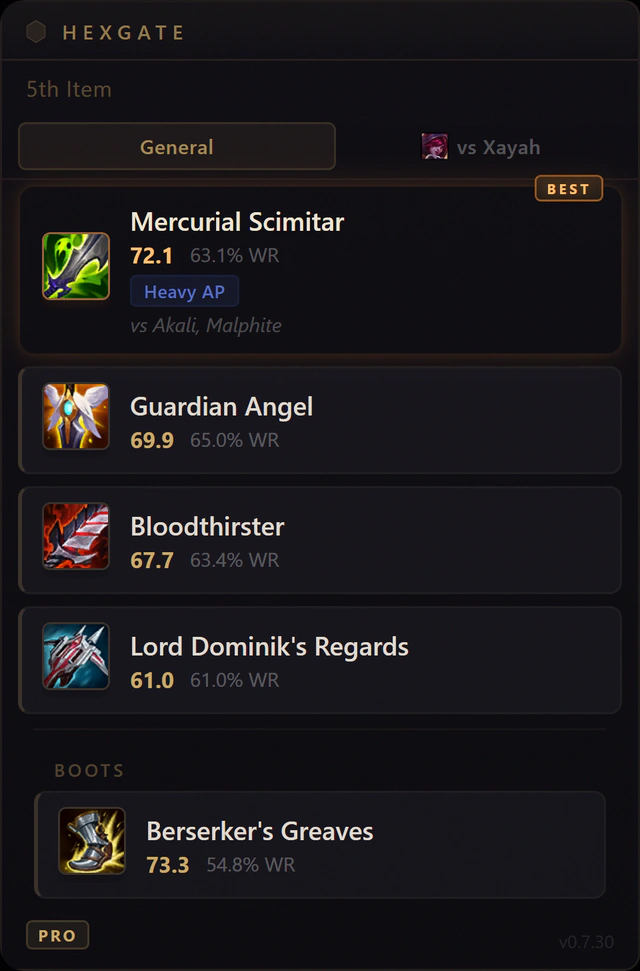
Akali and Malphite on the enemy team: Mercurial Scimitar leads Jinx's 5th item, tagged Heavy AP. A real screenshot of the overlay in game.
Keep your app, or let Hexgate cover the whole game.
Free, Hexgate answers the question both apps skip: what to buy against this enemy team. Pro+ covers the rest of the game too: Lane Scouting before it, a Match Breakdown and Clips after it, and the habits that repeat across games. It runs next to U.GG or Mobalytics, with no Overwolf and no ads.
Pick U.GG if you want the right build fast and a light install.
Rank and matchup filters, LP per game, a standalone app or no install at all, and the cheapest ad-free plan of the two. Best for players who already know how they want to improve and just want accurate data.
Mobalytics
Pick Mobalytics if you want a coach that tracks your progress.
GPI, matchup advice and post-game highlights give you a feedback loop U.GG does not attempt. Accept Overwolf, the ads on free, and $5.83 to $9.99 a month to unlock the best parts.
Hexgate
Pick Hexgate for builds against this enemy team, and coaching from your own games.
Free: items re-ranked against the five enemies, runes with one-click import, each lane's gold difference on League's scoreboard, no Overwolf and no ads. Pro+ adds Lane Scouting before the game, a Match Breakdown and Clips after it, and the habits you keep repeating. It also runs fine next to U.GG or Mobalytics.
U.GG is better for fast, accurate builds, runes and counters, filtered by rank and lane matchup, and for a light install. Mobalytics is better for improving over time: its GPI score, matchup advice and post-game highlights explain why you lose. Pick by the question you want answered.
Which is cheaper, U.GG Plus or Mobalytics Plus?
U.GG Plus. In October 2026 it costs $3.99 per month or $29.88 per year ($2.49 per month). Mobalytics Plus costs $9.99 per month, $24.99 per 3 months or $69.99 per year ($5.83 per month). Both have a 7-day free trial.
Does U.GG use Overwolf?
No. The U.GG desktop app installs as its own Windows program and does not need the Overwolf client. Mobalytics Desktop does run on Overwolf.
Can I use U.GG and Mobalytics together?
Yes. A common setup is U.GG for builds and runes during the game and Mobalytics on the web for a GPI review after a session, which avoids running Overwolf while you play.
Do U.GG or Mobalytics adapt builds to the enemy team?
Both recommend builds from aggregate data, decided before the game; U.GG lets you filter by rank, role and lane matchup. Hexgate is a separate overlay that reorders the situational items against the five enemies in your game while you play, free for 3 games a day; with Pro+ it also breaks down every ranked, Draft and Swiftplay game afterward.
Final Thoughts
U.GG and Mobalytics are rarely a real either-or. U.GG is the fastest way to get a good build for this game; Mobalytics is the most serious attempt at telling you what to fix across many games. If you can only run one app during games, the lighter, cheaper U.GG is the safer default, and Mobalytics' web profile still works without the desktop app. If you would rather have builds for the enemy team in front of you plus coaching from your own games, with no Overwolf at all, that is what Hexgate does.
Sources: prices and features were checked on u.gg/plus, u.gg/app, mobalytics.gg Plus and the Overwolf app store on October 4, 2026. Prices are in US dollars as shown to visitors at that date and can differ by region, by currency and during promotions.